Weapon Icons: A Versatile Asset for Modern Creative Projects
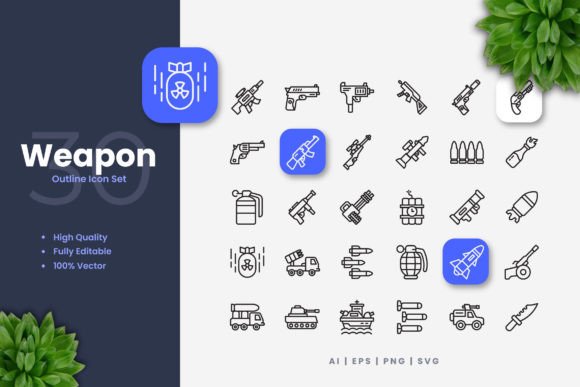
When you’re building a website, designing a mobile app, or creating marketing materials, the right visual elements can make or break your project’s clarity and impact. This is where a well-designed icon set becomes a critical tool. Specifically, a collection like Weapon Icons provides a focused library of symbols representing various weapons, from historical arms to modern tactical gear. But their utility extends far beyond the obvious. These aren’t just pictures; they are scalable, editable visual components designed to integrate seamlessly into your workflow.
Where Weapon Icons Find Their Utility
You might first think of gaming or military applications, and those are certainly strong use cases. A game developer needing clear icons for an inventory screen or a tactical simulation would find immediate value. However, the application of Weapon Icons is surprisingly broad. Consider a historical blog or educational website. Using a clean, recognizable dagger icon to tag articles about medieval warfare instantly improves visual navigation. A security consulting firm might use simplified shield or lock icons on their website’s service pages to convey concepts of protection and defense without resorting to cliché photography.
In mobile app design, where screen space is precious, a simple, bold weapon icon can function as a perfect button or category indicator for apps related to hobbies like fencing, historical reenactment, or even sport shooting. The key is the design philosophy: simple and clean. This aesthetic ensures the icons don’t overpower the layout but instead serve as intuitive guides for the user.
Adapting Icons for Diverse Audiences and Industries
The real power of a vector-based icon set like Weapon Icons lies in its adaptability. A graphic designer working on a flyer for an airsoft tournament can easily extract a rifle icon, resize it dramatically without quality loss, and change its color to match the event’s vibrant branding. A book author writing a fantasy novel might license the icons to create simple, evocative chapter decorations. An infographic about historical battle statistics becomes more engaging when key data points are marked with corresponding weapon symbols rather than generic bullets.
Different users benefit in different ways. The non-designer, perhaps a social media manager, benefits from the included PNG files with transparency. They can simply drag and drop a sword icon onto a banner post about a new podcast episode on knightly lore. The professional designer, however, will dive into the source AI or EPS files. Using vector software like Adobe Illustrator or CorelDRAW, they can edit stroke weights to make an axe icon appear more delicate for a logo or more robust for a poster, tweak colors to align with any palette, or even combine elements to create a unique hybrid symbol.
Practical Considerations Before Use
Before integrating any icon set into your project, a few practical checks are wise. First, consider the stylistic match. Weapon Icons’ simple and clean design leans towards modern minimalism. This might clash with a project that requires highly ornate, detailed illustrations. Assess if the icon style complements your overall visual theme.
Second, think about completeness. Does the set have the specific symbols you need? While a general “weapon” set covers a wide range, a project focused on, say, specific naval artillery might require more niche imagery. The strength here is the foundational variety, which can often be modified to suit specialized needs through vector editing.
A crucial consideration is the licensing and intended use. Always verify the license terms of the icon set to ensure compliance, especially for commercial products. Furthermore, be mindful of context. Weapon icons, while useful, carry inherent connotations. Their application in educational, gaming, or security contexts is typically straightforward. Using them in unrelated commercial branding could send unintended messages, so aligning their use with your content’s theme is essential.
The Workflow Advantage of Editable Vector Files
Many downloadable assets come as static images, locking you into a specific size and color. This limitation often creates friction in a design process. Weapon Icons, by including fully editable vector source files, removes that barrier. The ability to change color is not just about aesthetics; it’s about functionality. A dark icon might disappear on a dark background, but with a minute in Illustrator, you can recolor it to a contrasting hue for perfect visibility.
Editing stroke weight is another transformative feature. A thin-line icon might convey elegance and work well for a website footer, while the same icon with a thickened stroke can become a bold, attention-grabbing element for a poster or event banner. This level of control means the icon set isn’t a one-time purchase but a reusable resource that evolves with your various projects over time.
From Digital Screens to Physical Prints
The included file formats—AI, EPS, SVG, and PNG—directly support this multi-platform utility. The SVG file is perfect for modern web development, ensuring icons look sharp on any screen resolution. The PNGs with transparency offer quick solutions for digital compositing. The EPS and AI files are the workhorses for professional print design. Whether you’re producing high-quality flyers, banners, or even merchandise, these vector formats guarantee that your Weapon Icons will print crisply at any scale, from a business card to a billboard.
This seamless transition from digital to physical media underscores the set’s core value: it is a unified visual language. A book publisher can use the same vector sword icon for the cover illustration (adjusted and integrated by a designer) and the social media marketing campaign (using a derived PNG). This consistency strengthens brand and message recognition across all touchpoints.
Ultimately, a resource like Weapon Icons solves a common creative problem: finding appropriate, high-quality, and flexible visuals. It shifts the focus from searching for or creating disparate images to efficiently implementing and adapting a coherent visual set. By providing the tools for customization directly to the user, it empowers both professionals and enthusiasts to enhance their projects with clarity and style, wherever those projects may live.