Elevate Your Professional Story with the Morph Presentation Template
In a world saturated with information, how you present your ideas can be the difference between being heard and being forgotten. A presentation isn’t just a document; it’s a narrative tool, a visual story of your work, your company, or your vision. The Morph PowerPoint Presentation Template is designed specifically to be that powerful storytelling partner. It transforms the often-technical task of building a deck into a creative, streamlined process, enabling you to craft a narrative that resonates.
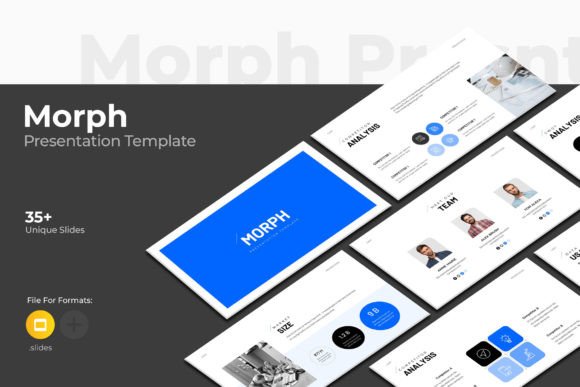
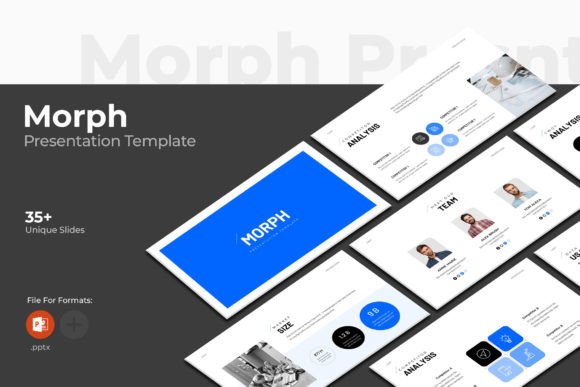
At its core, Morph is a simple, contemporary, yet powerfully designed template. Its aesthetic is clean and professional, avoiding clutter without sacrificing visual impact. This clarity is its greatest strength, allowing your content to take center stage. But simplicity here doesn’t mean blandness. The template includes a wealth of dynamic elements—creative photo layouts that break the grid, infographics that visualize data intuitively, tables, vector icons, and diagrams—all designed to give you the tools to explain complex ideas with elegance.
A Creative Framework, Not a Constraint
What makes Morph interesting is its role as a framework for your creativity. It provides a cohesive structure—36 slides in total, based on master slides for consistent formatting—so you don’t start from a blank page. This foundation allows you to focus on content and customization. Imagine you’re a marketer pitching a new campaign. The infographic slides let you map the customer journey visually. An entrepreneur can use the clean profile slides to showcase company milestones with impactful photo layouts. An educator might employ the diagram slides to break down a scientific process, making it accessible.
The template invites variation. With a 16x9 Full HD ratio (1920x1080px), it’s perfectly suited for modern screens and projectors. The included theme color option means you can instantly align the entire deck with your brand palette. This isn’t just about changing a few accents; it’s about creating a holistic visual identity within the presentation. The bonus of 4000 PPTX icons offers another layer of customization. Instead of searching for disparate icons, you have a consistent library at your fingertips to symbolize concepts, denote steps, or simply add refined visual cues.
Adapting Morph for Your Unique Audience and Goals
Different users will adapt Morph for profoundly different goals. A freelancer crafting a portfolio presentation might emphasize the creative photo layouts to showcase project visuals, using minimal text to let the work speak. A small business owner preparing an investor deck would leverage the tables and infographics to present financial projections and market data with clarity and authority. The key is to interpret the template through the lens of your audience’s needs.
For a technical audience, such as engineers or developers, the clean diagrams and resizable graphics become crucial. You can edit these elements to map out architectures or workflows precisely, using the template’s structure to ensure the presentation remains organized and readable. For a non-technical audience, like clients or general consumers, the same template supports a more narrative flow. You can use the sequenced slides to build a story, employing the vector icons as visual metaphors and the photo layouts to create emotional connection.
The promise of “no knowledge required in any application” is significant. Morph is provided in the familiar PowerPoint PPTX format. Editing is intuitive: easy drag and drop to change pictures, fully editable and resizable graphics, and free fonts linked in the help file. This democratizes design. A blogger can create a stunning seminar deck without learning new software. A hobbyist presenting a community project can achieve a professional look quickly. You choose what and how you edit, focusing only on your message.
Practical Inspiration for Your Projects
Let’s consider realistic applications. Beyond the obvious business pitch or company profile, Morph can be the foundation for an online course module. The slide structure naturally segments topics, and visual elements can reinforce learning. It could serve as a digital brochure for a service-based business, where each slide details a service offering with accompanying icons and imagery. For internal team meetings, the template’s tables and diagrams can organize quarterly reviews or strategy sessions, making complex information team-friendly.
To keep results clear and effective, lean on the master slide consistency. Use the preset title and body text layouts to maintain typographic harmony throughout. When changing pictures via drag-and-drop, aim for high-quality, relevant images that complement, not overwhelm, the text. While the graphics are fully resizable, maintain a balanced scale relative to other elements on the slide to preserve the clean aesthetic. Originality comes from your content and how you combine the template’s components—perhaps using an infographic slide not for data, but to visually list key team values with icons.
Balancing Creative Freedom with Cohesive Design
The challenge in any template use is balancing creative freedom with cohesive design. Morph’s built-in consistency helps enormously. As you explore different photo layouts—some full-screen, some split, some with overlays—select those that best serve the emotional tone of that particular slide. For a product launch, a bold full-screen image might open the section. For a detailed feature list, a split layout with image on one side and text on the other could be more effective.
Remember that support is part of the package. The inclusion of free real support from skilled designers is a practical safety net. If you encounter a specific editing question or have an inquiry about customizing a element beyond the help file PDF, that direct line turns the template from a product into a partnership. It ensures you can push the template to fit your unique vision without hitting a technical wall.
Ultimately, the Morph PowerPoint Presentation Template is more than a set of slides. It’s a system for elevating communication. It empowers you to present your work and your company profile on another level by providing the design intelligence upfront. You bring the story, the data, the vision. Morph provides the stage to present it with professionalism, clarity, and undeniable impact. The result is a presentation that feels thoughtfully crafted, uniquely yours, and compelling to any audience you face.